




토큰 기반 인증
•
사용자 인증 확인 방법을 두 가지로 나누면, 세션 기반 인증(서버 기반 인증)과 토큰 기반 인증이 있다.
•
토큰은 서버에서 요청을 받을 때, 요청을 보낸 클라이언트를 구분하기 위한 유일한 값이다.
•
서버가 토큰을 생성해서 클라이언트에게 제공하면, 클라이언트는 해당 토큰을 보관하고 있다가 여러 요청을 토큰과 함께 보낸다 (토큰 = 신분증)
•
서버는 토큰을 확인 후 해당 클라이언트가 유효한 사용자인지 검증하고, 요청을 처리해준다.
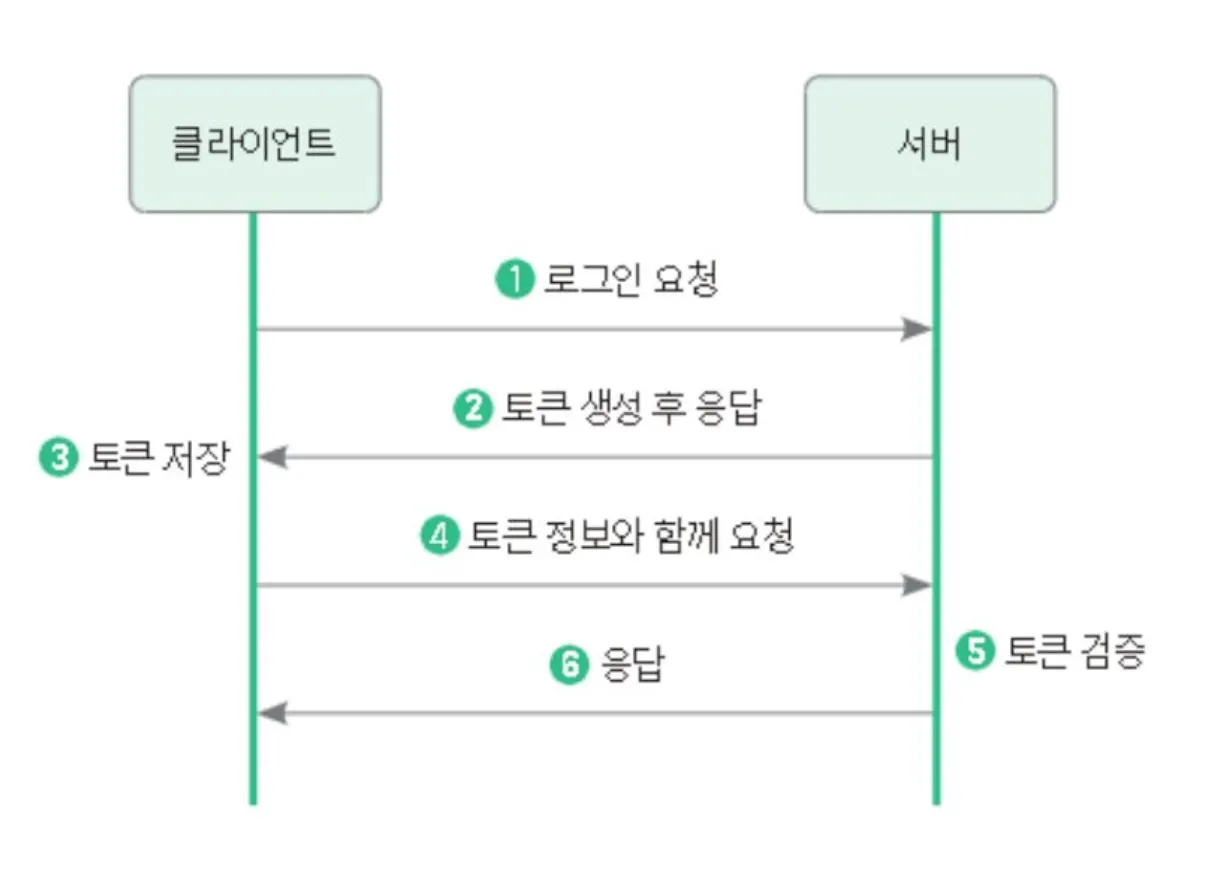
토큰 기반 인증 특징
•
무상태성
◦
사용자의 인증 정보가 담겨 있는 토큰이 클라이언트에서 보관되기 때문에, 서버는 이를 저장할 필요가 없다.
◦
서버가 모든 데이터를 갖고 있으려면 많은 자원을 소비하게 되는데, 토큰 기반 인증은 클라이언트가 토큰을 관리한다.
◦
이렇게 하면 서버는 클라이언트의 인증 정보를 저장하거나 유지하지 않아도 되기 때문에 완전한 무상태로 효율적인 검증이 가능해진다.
•
확장성
◦
서버를 확인할 때 상태 관리에 대한 신경을 쓸 필요가 없어지기 때문에 서버 확장에 용이해진다.
◦
예를 들어 결제 서버와 주문 서버가 따로 분리되어 있더라도, 하나의 토큰으로 결제 서버와 주문 서버에게 요청을 보낼 수 있게 된다.
◦
추가로 SNS 로그인과 같이 토큰 기반 인증을 사용하는 다른 시스템에 접근해 로그인 방식을 확장할 수도 있다.
•
무결성
◦
토큰 방식은 HMAC(Hash-based Maessage AuthentiCation)기법 이라고도 부르는데, 토큰을 발급한 이후에는 토큰 정보를 변경할 수 없다.
◦
만약에 누군가가 토큰을 한 글자라도 변경하면, 서버에서는 유효하지 않은 토큰으로 판단한다.
JWT
•
발급받은 JWT를 이용해 인증을 하려면 HTTP 요청 헤더 중에 Authorization 값에 Bearer + JWT토큰값 을 넣어서 보내야 한다.
•
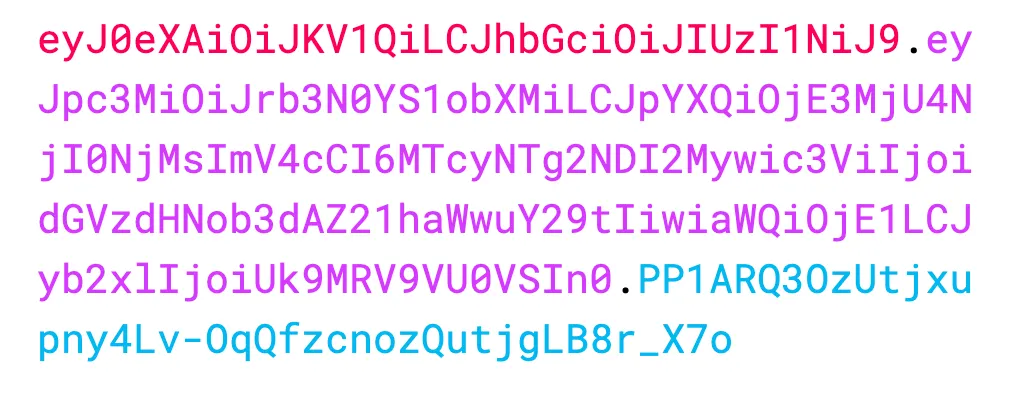
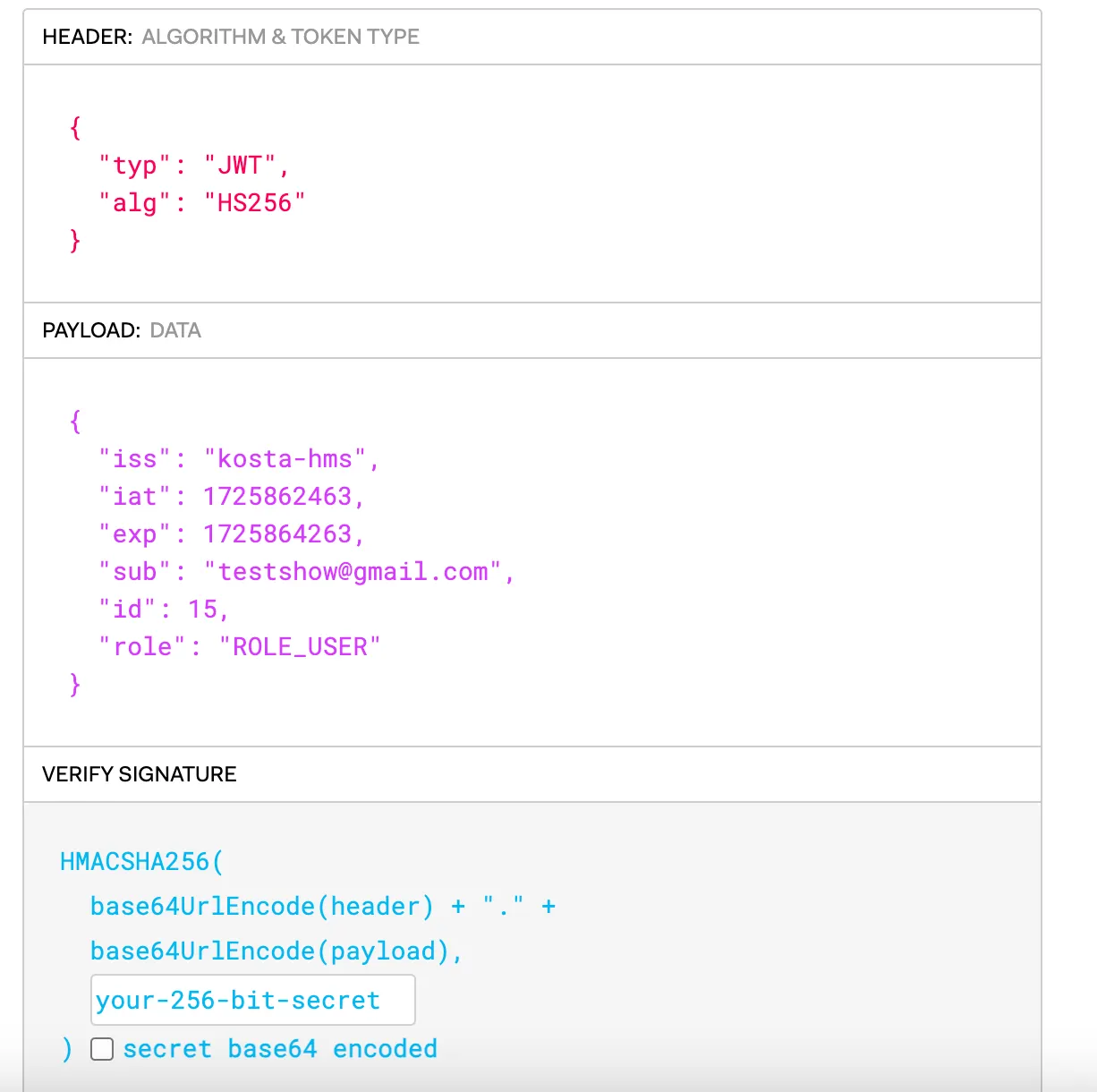
JWT은 . 을 기준으로 헤더(Header), 내용(Payload), 서명(Signature)으로 구성되어 있다.
◦
헤더 : 토큰의 타입과 해싱 알고리즘을 지정하는 정보.
◦
내용
▪
토큰과 관련된 정보로 내용의 한 덩어리를 클레임(Claim) 이라고 부르며, 클레임은 키와 값의 한 쌍으로 이루어져 있다. 클레임은 등록된 클레임, 공개 클래임, 비공개 클레임으로 나뉜다.
▪
등록된 클레임은 토큰에 대한 정보를 담는데 사용된다.
iss : 토큰 발급자
sub: 토큰 제목
aud: 토큰 대상자
exp: 토큰 만료 시간
nbf: 토큰의 활성 날짜
iat: 토큰 발급 시간
jti: JWT의 고유 식별자 (주로 일회용 토큰에 사용)
◦
서명 : 해당 토큰이 조작되었거나 변경되지 않았음을 확인하는 비밀키.
•
토큰을 주고 받는 환경에서 보안 취약점으로 인해 토큰이 노출되면 탈취가 가능해진다.
•
토큰을 탈취한 사람이 요청을 보내도 서버는 이를 알아차릴 수 없기에 정상적으로 요청을 처리한다.
•
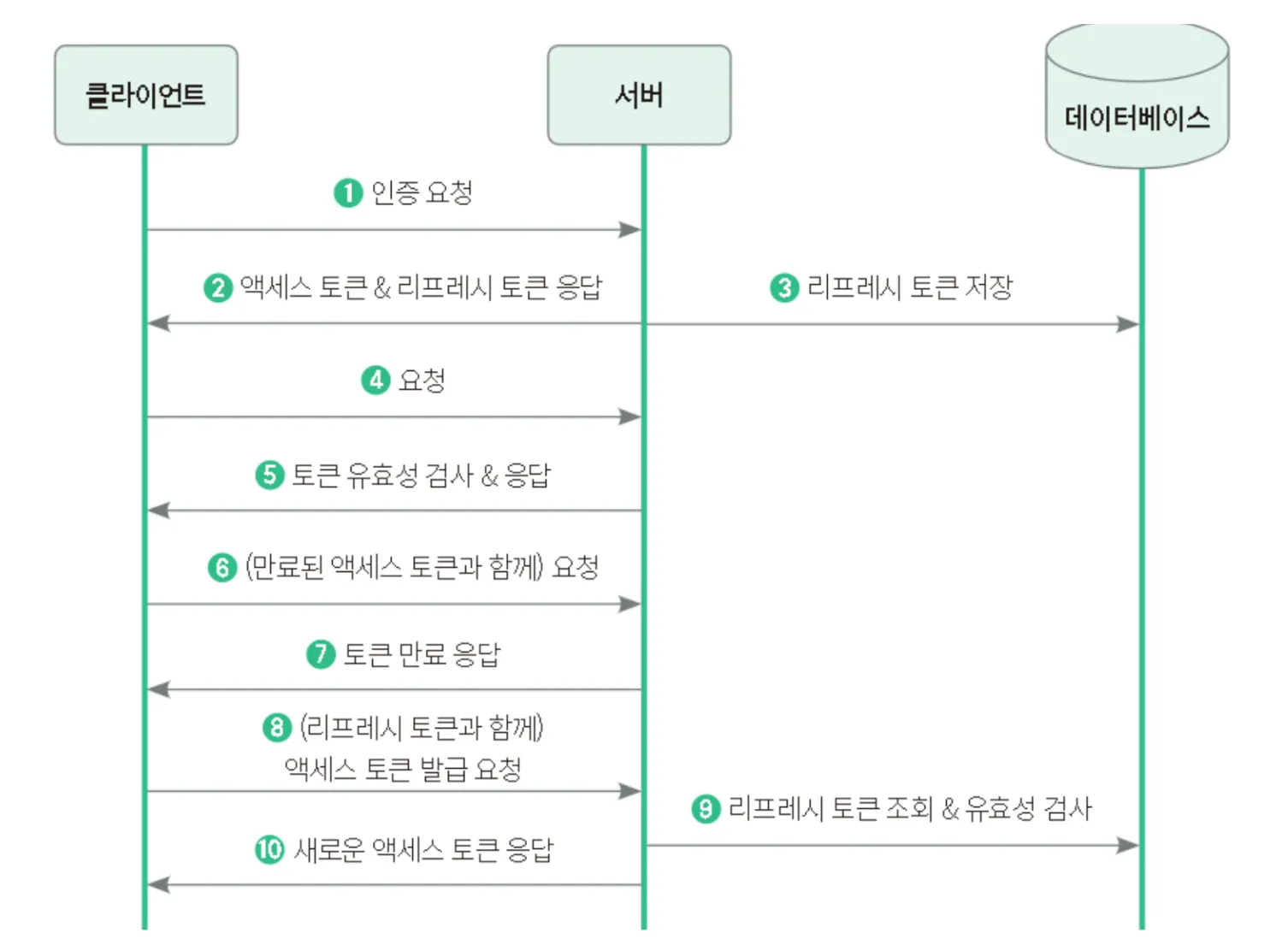
토큰은 유효기간을 설정할 수 있다.
•
일반 토큰(액세스 토큰)에 리프레시 토큰을 추가하여 이용한다.
•
리프레시 토큰은 엑세스 토큰이 만료되었을 때, 새로운 액세스 토큰을 발급하기 위해 사용한다.
•
따라서 액세스 토큰의 유효 기간을 짧게 설정하고, 리프레시 토큰의 유효기간을 길게 설정하면,
공격자가 액세스 토큰을 탈취하더라도 리프레시 토큰을 알지 못하면 사용 불가능한 토큰이 되어버리기 때문에 보다 안전해진다.
•
Jwt 관련 핵심 코드 정리
package com.kosta.config;
import lombok.Getter;
import lombok.Setter;
import org.springframework.boot.context.properties.ConfigurationProperties;
import org.springframework.stereotype.Component;
@Getter
@Setter
@Component
@ConfigurationProperties("jwt") // application.yml 에 설정한 jwt.issuer, jwt.secret_key... 이 매핑된다.
public class JwtProperties {
private String issuer;
private String secretKey;
private int accessDuration;
}
Java
복사
package com.kosta.config;
import com.kosta.entity.User;
import com.kosta.service.UserDetailServiceImpl;
import io.jsonwebtoken.Claims;
import io.jsonwebtoken.Jwts;
import io.jsonwebtoken.security.Keys;
import lombok.RequiredArgsConstructor;
import lombok.extern.slf4j.Slf4j;
import org.springframework.security.authentication.UsernamePasswordAuthenticationToken;
import org.springframework.security.core.Authentication;
import org.springframework.stereotype.Service;
import javax.crypto.SecretKey;
import java.util.Date;
@Slf4j
@Service
@RequiredArgsConstructor
public class JwtProvider {
// JWT 관련 설정 정보 객체 주입
private final JwtProperties jwtProperties;
private UserDetailServiceImpl userDetailsService;
// JWT Access 토큰 생성
public String generateAccessToken(User user) {
log.info("[generateAccessToken] 토큰을 생성합니다.");
Date now = new Date();
Date expiredDate = new Date(now.getTime() + jwtProperties.getAccessDuration());
return makeToken(user, expiredDate);
}
// JWT 토큰 생성 메서드
private String makeToken(User user, Date expiredDate) {
String token = Jwts.builder()
.header().add("typ", "JWT") // JWT의 타입을 명시
.and()
.issuer(jwtProperties.getIssuer()) // 발행자 정보 설정
.issuedAt(new Date()) // 발행일시 설정
.expiration(expiredDate) // 만료시간 설정
.subject(user.getEmail()) // 토큰의 주제(Subject) 설정 _ 사용자 이메일
.claim("id", user.getId())
.claim("role", user.getRole().name())
.signWith(getSecretKey(), Jwts.SIG.HS256) // 비밀키와 해시 알고리즘 사용하여 토큰 설명값 설정
.compact(); // 토큰 정보들을 최종적으로 압축해서 문자열로 반환
log.info("[makeToken] 완성된 토큰 : {}", token);
return token;
}
// 비밀키 만드는 메서드
private SecretKey getSecretKey() {
return Keys.hmacShaKeyFor(jwtProperties.getSecretKey().getBytes());
}
// JWT 토큰 유효성 검증 메서드
public boolean validToken(String token) {
log.info("[validToken] 토큰 검증을 시작합니다.");
try {
Jwts.parser().
verifyWith(getSecretKey()) // 비밀키로 서명 검증
.build()
.parseSignedClaims(token); // 서명된 클레임을 파싱..
log.info("[validToken] 토큰 검증 통과.");
return true;
} catch (Exception e) {
e.printStackTrace();
}
log.info("[validToken] 토큰 검증 실패.");
return false;
}
// JWT 토큰에서 정보(Claim) 추출 메서드
private Claims getClaims(String token) {
log.info("[getClaims] 토큰에서 정보(Claim) 추출");
return Jwts.parser()
.verifyWith(getSecretKey()) // 비밀키로 서명 검증
.build()
.parseSignedClaims(token) // 서명된 클레임을 파싱
.getPayload(); // 파싱된 클레임에서 페이로드(실제 클레임)를 반환
}
// JWT 토큰에서 인증 정보 반환하는 메서드
public Authentication getAuthenticationByToken(String token) {
log.info("[getAuthenticationByToken] 토큰 인증 정보 조회");
String userEmail = getUserEmailByToken(token);
User user = (User) userDetailsService.loadUserByUsername(userEmail);
Authentication authentication = new UsernamePasswordAuthenticationToken(
user, token, user.getAuthorities()
);
return authentication;
}
// JWT 토큰에서 사용자 ID만 추출하는 메서드
public String getUserEmailByToken(String token) {
log.info("[getUserEmailByToken] 사용자 ID 추출");
Claims claims = getClaims(token);
String email = claims.get("email", String.class);
return email;
}
}
Java
복사
•
Sprint Security 쪽 코드
package com.kosta.config;
import com.kosta.service.UserDetailServiceImpl;
import lombok.RequiredArgsConstructor;
import org.springframework.context.annotation.Bean;
import org.springframework.context.annotation.Configuration;
import org.springframework.security.config.annotation.web.builders.HttpSecurity;
import org.springframework.security.config.annotation.web.configuration.EnableWebSecurity;
import org.springframework.security.config.annotation.web.configurers.AbstractHttpConfigurer;
import org.springframework.security.config.annotation.web.configurers.HttpBasicConfigurer;
import org.springframework.security.config.http.SessionCreationPolicy;
import org.springframework.security.core.userdetails.UserDetailsService;
import org.springframework.security.crypto.bcrypt.BCryptPasswordEncoder;
import org.springframework.security.web.SecurityFilterChain;
import org.springframework.security.web.authentication.UsernamePasswordAuthenticationFilter;
import org.springframework.security.web.util.matcher.AntPathRequestMatcher;
@Configuration
@EnableWebSecurity
@RequiredArgsConstructor
public class WebSecurityConfig {
private final UserDetailsService userDetailsService;
private final JwtProperties jwtProperties;
// JWT Provider
@Bean
JwtProvider jwtProvider() {
return new JwtProvider(jwtProperties, userDetailsService);
}
// 암호화 빈
@Bean
BCryptPasswordEncoder bCryptPasswordEncoder() {
return new BCryptPasswordEncoder();
}
// HTTP 요청에 따른 보안 구성
@Bean
SecurityFilterChain filterChain(HttpSecurity http) throws Exception {
// 경로 권한 설정
http.authorizeHttpRequests(auth ->
// 특정 URL 경로에 대해서는 인증 없이 접근 가능
auth.requestMatchers(
new AntPathRequestMatcher("/api/auth/login"), // 로그인
new AntPathRequestMatcher("/api/auth/signup"), // 회원가입
new AntPathRequestMatcher("/api/auth/duplicate") // 이메일 중복체크
).permitAll()
// AuthController 중 나머지들은 "ADMIN"만 가능
.requestMatchers(
new AntPathRequestMatcher("/api/auth/**") // "ADMIN"만 가능
).hasRole("ADMIN")
// 그 밖의 다른 요청들은 인증을 통과한(로그인한) 사용자라면 모두 접근할 수 있도록 한다.
.anyRequest().authenticated()
);
// 무상태성 세션 관리
http.sessionManagement((sm -> sm.sessionCreationPolicy(SessionCreationPolicy.STATELESS)));
// (토큰을 통해 검증할 수 있도록) 필터 추가
http.addFilterBefore(new JwtAuthenticationFilter(jwtProvider()), UsernamePasswordAuthenticationFilter.class);
// HTTP 기본 설정
http.httpBasic(HttpBasicConfigurer::disable);
// CSRF 비활성화
http.csrf(AbstractHttpConfigurer::disable);
// CORS 비활성화 (나중에 변경)
http.cors(AbstractHttpConfigurer::disable);
return http.getOrBuild();
}
}
Java
복사
•
실습 테스트
=== raw-data ===
{
"email": "testshow@gmail.com",
"password": "minsung1234"
}
=== 결과 ===
{
"accessToken": "eyJ0eXAiOiJKV1QiLCJhbGciOiJIUzI1NiJ9.eyJpc3MiOiJrb3N0YS1obXMiLCJpYXQiOjE3MjU4NjI0NjMsImV4cCI6MTcyNTg2NDI2Mywic3ViIjoidGVzdHNob3dAZ21haWwuY29tIiwiaWQiOjE1LCJyb2xlIjoiUk9MRV9VU0VSIn0.PP1ARQ3OzUtjxupny4Lv-OqQfzcnozQutjgLB8r_X7o"
}
JSON
복사
JWT Token 확인
•
react 상에서 jwt 관련 패키지 추가
$ yarn add jwt-decode
Java
복사