


들어가며
DungeonTalk 팀 위키
DungeonTalk 설명
DungeonTalk은 AI가 실시간으로 스토리를 생성하고 플레이어와 상호작용하는 TRPG 게임 플랫폼이다. 플레이어는 판타지 세계, 좀비 아포칼립스 등의 세계관을 선택하여 AI 게임 마스터가 진행하는 게임에 참여한다. AI 게임 마스터는 RAG 기반 대화 문맥을 유지하는 구조를 통해 플레이어들의 행동과 선택을 실시간으로 분석하여 그에 맞는 스토리를 생성하고, 이전 대화 맥락을 기억하며 일관된 게임 경험을 제공한다. 플레이어들은 AI 게임 마스터와의 대화뿐만 아니라 파티원들과 실시간으로 소통하며 전략을 세우고 협력하여 게임을 진행할 수 있다.
부하 테스트
TRPG 게임인 DungeonTalk 프로젝트의 서비스 품질 테스트를 위해 k6 기반 로그인 및 API 부하 테스트를 진행하였다.
테스트 결과 요약
핵심 지표 (VU 300 기준)
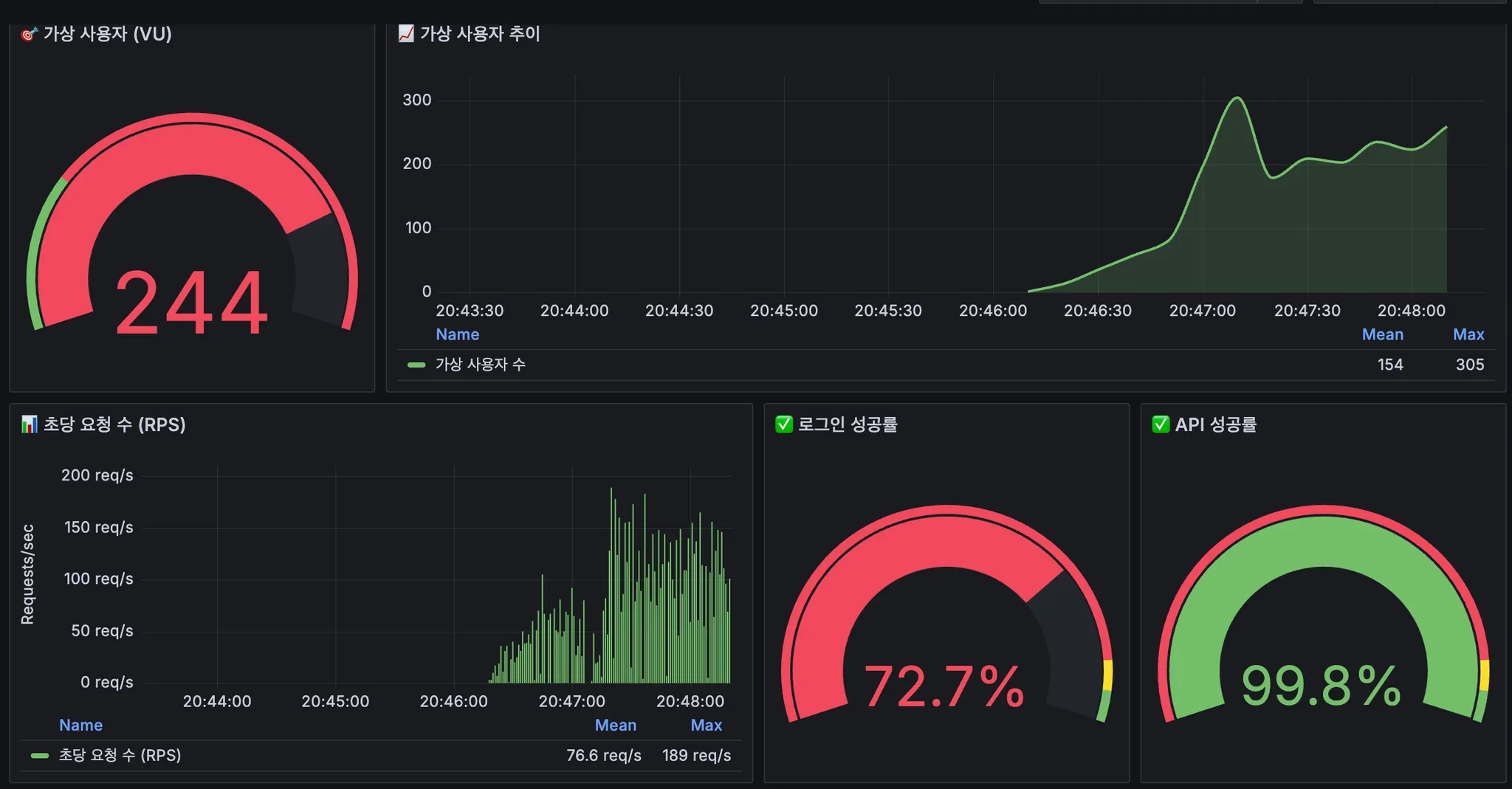
항목 | 목표 | 실제 결과 | 달성 여부 |
API 성공률 | 98% | 99.78% | 통과 |
로그인 성공률 | 98% | 83.48% | 실패 (16.5% 차이) |
전체 실패율 | < 1% | 3.65% | 실패 (3.6배 초과) |
API p(95) 응답 시간 | < 500ms | 3.11s | 실패 (6.2배 초과) |
로그인 p(95) 응답 시간 | < 1.5s | 26.91s | 실패 (18배 초과) |
로그인 p(99) 응답 시간 | < 2.5s | 47.78s | 실패 (19배 초과) |
처리량 | - | 79.84 req/s | 측정값 |
주요 문제점
•
로그인 성능 심각한 저하
◦
평균 응답 시간: 5.87s
◦
실패: 462건 / 2797건 (16.5%)
◦
Dropped iterations: 1539건
•
전체 실패율 높음
◦
485건 / 13,261건 실패
◦
대부분 로그인 실패
원인 분석
BruteForceManager의 보안 방어 메커니즘
로그인 보안을 위해 개발한 BruteForce 로직으로 인해 부하 테스트 진행 과정이 매끄럽지 못함을 확인했다.
작동 방식
public void loginFailed(String username) throws InterruptedException {
failCount++;
if (failCount < 5) {
// 지수 백오프: 1초, 2초, 4초, 8초
long delayMillis = (long) Math.pow(2, failCount - 1) * 1000L;
Thread.sleep(delayMillis); // ← 문제!
} else {
// 5회 이상 실패 → 10분간 계정 잠금
redisTemplate.opsForValue().set(lockKey, "LOCKED", Duration.ofMinutes(10));
}
}
Java
복사
문제점
•
Thread.sleep()으로 스레드 블로킹
◦
로그인 실패 시 1초, 2초, 4초, 8초 동안 스레드 대기
◦
고부하 환경에서 스레드 풀 고갈
◦
다른 정상 요청도 처리 지연
•
동시성 경쟁 조건
◦
3명의 사용자에 대해 150 VUs 동시 로그인
◦
각 사용자당 약 50 VUs 동시 시도
◦
Redis 동시 접근으로 일부 요청 실패 → Delay 발생 → 악순환
•
Dropped Iterations
◦
1539건의 요청이 제 시간에 처리되지 못함
◦
constant-arrival-rate executor가 목표 RPS를 달성하지 못함
성능 저하 계산
•
시나리오
◦
로그인 시도: 2797건
◦
실패: 462건 (16.5%)
•
지연 시간 추정
◦
1회 실패: 1초 지연
◦
2회 실패: 2초 지연
◦
3회 실패: 4초 지연
◦
4회 실패: 8초 지연
평균 지연 시간: (1 + 2 + 4 + 8) / 4 = 3.75초
총 지연 시간: 462건 × 3.75초 ≈ 1732초 (28.8분)
개선 방안
환경별 설정 분리
•
application-dev.properties 추가
# Brute Force Protection (개발 환경 완화)
brute-force.enabled=true
brute-force.max-attempts=10 # 5 → 10
brute-force.delay-enabled=false # Delay 비활성화
brute-force.cooldown-minutes=1 # 10분 → 1분
YAML
복사
•
BruteForceManager 수정
@Value("${brute-force.enabled:true}")
private boolean enabled;
@Value("${brute-force.max-attempts:5}")
private int maxAttempts;
@Value("${brute-force.delay-enabled:true}")
private boolean delayEnabled;
@Value("${brute-force.cooldown-minutes:10}")
private int cooldownMinutes;
public void loginFailed(String username) throws InterruptedException {
if (!enabled) return; // 비활성화 시 바로 리턴
failCount++;
redisTemplate.opsForValue().set(failKey, String.valueOf(failCount), Duration.ofMinutes(15));
if (failCount < maxAttempts) {
if (delayEnabled) { // Delay 활성화 시에만
long delayMillis = (long) Math.pow(2, failCount - 1) * 1000L;
Thread.sleep(delayMillis);
}
} else {
String lockKey = "login_lock:" + username;
redisTemplate.opsForValue().set(lockKey, "LOCKED", Duration.ofMinutes(cooldownMinutes));
}
}
Java
복사
테스트 사용자 수 증가
현재: 3명 (test_user_1, test_user_2, test_user_3)
개선: 50-100명
#!/bin/bash
for i in {1..100}; do
curl -s -X POST http://localhost:8080/v1/members \
-H "Content-Type: application/json" \
-d "{\"name\":\"load_test_user_$i\",\"password\":\"password123\",\"nickName\":\"부하테스트$i\"}"
done
Bash
복사
•
load-test.js 수정
import http from 'k6/http';
import { check, sleep } from 'k6';
import exec from 'k6/execution';
import { Rate, Trend, Counter } from 'k6/metrics';
// === Metrics
const loginSuccess = new Rate('login_success');
const apiSuccess = new Rate('api_success');
const loginDur = new Trend('login_duration');
const apiDur = new Trend('api_duration');
const totalReq = new Counter('total_requests');
export const options = {
// setup()에서 응답 body가 필요하므로 전역 discard 비활성화
// 대신 개별 함수에서 필요시 body를 버림
discardResponseBodies: false,
thresholds: {
// 전체 실패율
http_req_failed: ['rate<0.01'],
// 태그별 응답시간 목표(포트폴리오에 "로그인/일반 API 분리 측정" 어필 포인트)
'http_req_duration{endpoint:login}': ['p(95)<1500', 'p(99)<2500'],
'http_req_duration{endpoint:chatrooms_list}': ['p(95)<500', 'p(99)<1000'], // 개선된 목표
login_success: ['rate>0.98'],
api_success: ['rate>0.98'],
},
scenarios: {
// 로그인 부하 → 토큰 확보 성능
login_ramp: {
executor: 'ramping-vus',
startVUs: 0,
stages: [
{ duration: '45s', target: 100 },
{ duration: '1m30s', target: 150 },
{ duration: '30s', target: 0 },
],
exec: 'loginOnly',
gracefulStop: '10s',
},
// API 부하 → 토큰 재사용하여 리스트 조회 (최적화)
api_constant: {
executor: 'constant-arrival-rate',
rate: 100, // 초당 100 req (증가)
timeUnit: '1s',
duration: '2m',
preAllocatedVUs: 100,
maxVUs: 200,
exec: 'apiOnly',
startTime: '45s', // 로그인 부하가 올라간 뒤 시작
gracefulStop: '10s',
},
},
};
const BASE_URL = __ENV.BASE_URL || 'http://localhost:8080';
const USERS = [
{ name: 'test_user_1', password: 'password123' },
{ name: 'test_user_2', password: 'password123' },
{ name: 'test_user_3', password: 'password123' },
];
// 간단한 랜덤 IP 생성(레이트리밋 회피용)
function randomIp() {
return `${Math.floor(Math.random()*256)}.${Math.floor(Math.random()*256)}.${Math.floor(Math.random()*256)}.${Math.floor(Math.random()*256)}`;
}
// setup 단계에서 토큰 미리 발급
export function setup() {
console.log(`\n Setup: Generating tokens for ${USERS.length} users...`);
console.log(`Target URL: ${BASE_URL}`);
const tokens = [];
for (let user of USERS) {
const res = http.post(
`${BASE_URL}/v1/auth/login`,
JSON.stringify({ name: user.name, password: user.password }),
{ headers: { 'Content-Type': 'application/json', 'X-Forwarded-For': randomIp() } }
);
// 응답 상태 로깅
if (res.status !== 200) {
console.error(`Login failed for ${user.name}: HTTP ${res.status}`);
console.error(`Response: ${res.body ? res.body.substring(0, 200) : 'empty'}`);
continue;
}
try {
const data = JSON.parse(res.body);
const token = data.data?.accessToken;
if (token) {
tokens.push({ username: user.name, token: token });
console.log(`Token generated for ${user.name}`);
} else {
console.error(`No token in response for ${user.name}`);
console.error(`Response structure: ${JSON.stringify(data).substring(0, 200)}`);
}
} catch (e) {
console.error(`Failed to parse response for ${user.name}: ${e.message}`);
console.error(`Response body: ${res.body ? res.body.substring(0, 200) : 'empty'}`);
}
}
if (tokens.length === 0) {
console.error('\n FATAL: No tokens generated! Cannot proceed with test.');
console.error(' Please check:');
console.error(' 1. Application is running at ' + BASE_URL);
console.error(' 2. Test users exist in database');
console.error(' 3. Login endpoint is accessible\n');
throw new Error('Setup failed: No tokens generated');
}
console.log(`\n Setup complete: ${tokens.length}/${USERS.length} tokens generated\n`);
return { tokens };
}
export function loginOnly() {
const u = USERS[Math.floor(Math.random() * USERS.length)];
const headers = {
'Content-Type': 'application/json',
'X-Forwarded-For': randomIp(),
};
const start = Date.now();
const res = http.post(
`${BASE_URL}/v1/auth/login`,
JSON.stringify({ name: u.name, password: u.password }),
{ headers, tags: { endpoint: 'login' } }
);
loginDur.add(Date.now() - start);
totalReq.add(1);
const ok = check(res, {
'login 200': (r) => r.status === 200,
'has accessToken': (r) => {
try { return JSON.parse(r.body).data?.accessToken; } catch { return false; }
},
});
loginSuccess.add(ok);
sleep(0.2);
}
export function apiOnly(data) {
// setup에서 받은 토큰 재사용 (로그인 불필요)
if (!data || !data.tokens || data.tokens.length === 0) {
console.error('No tokens available from setup');
return;
}
const tokenData = data.tokens[Math.floor(Math.random() * data.tokens.length)];
const ip = randomIp();
// 인증 API 호출 (로그인 없이 바로 API 호출)
const start = Date.now();
const apiRes = http.get(
`${BASE_URL}/v1/chat/room`,
{ headers: { Authorization: `Bearer ${tokenData.token}`, 'X-Forwarded-For': ip }, tags: { endpoint: 'chatrooms_list' } }
);
apiDur.add(Date.now() - start);
totalReq.add(1);
const ok = check(apiRes, { 'api 200': (r) => r.status === 200 });
apiSuccess.add(ok);
// 현실적인 think time
sleep(0.1 + Math.random() * 0.2); // 짧게 조정
}
JavaScript
복사
부하 테스트 성능 개선 결과
AS-IS
테스트 환경
•
VUs: 300 (login_ramp 150, api_constant 200)
•
Duration: 2분 45초
•
테스트 사용자: 3명
주요 지표
항목 | 값 | 상태 |
로그인 성공률 | 83.48% | 목표 98% 미달 |
로그인 p(95) | 26.91초 | 목표 1.5초 대비 18배 초과 |
로그인 p(99) | 47.78초 | 목표 2.5초 대비 19배 초과 |
API p(95) | 3.11초 | 목표 500ms 대비 6배 초과 |
전체 실패율 | 3.65% | 목표 1% 초과 |
처리량 | 79.84 req/s | 측정값 |
로그인 실패 | 462건 / 2,797건 | - |
병목 원인 분석
•
BruteForceManager Thread.sleep() 블로킹
◦
로그인 실패 시 1초, 2초, 4초, 8초 지수 백오프
◦
평균 지연 3.75초 × 462건 ≈ 28.8분 누적 지연
•
동시성 경쟁 조건
◦
3명 사용자 × 150 VUs = 사용자당 50 VUs 동시 시도
◦
Redis 동시 접근으로 일부 실패 → 악순환
•
인프라 병목
◦
HikariCP 기본 연결풀 10개
◦
Redis 연결풀 미설정
TO-BE
적용 개선 사항
•
BruteForceManager 환경별 설정 분리
# application-dev.properties
brute-force.enabled=true
brute-force.max-attempts=10 # 5 → 10
brute-force.delay-enabled=false # Thread.sleep() 비활성화
brute-force.cooldown-minutes=1 # 10분 → 1분
YAML
복사
•
인프라 최적화
◦
HikariCP 연결풀: 10 → 50
◦
Lettuce Redis 연결풀 설정
spring.datasource.hikari.maximum-pool-size=50
spring.datasource.hikari.minimum-idle=10
spring.datasource.hikari.connection-timeout=10000
spring.datasource.hikari.idle-timeout=300000
spring.datasource.hikari.max-lifetime=600000
spring.datasource.hikari.pool-name=DungeonTalkHikariCP
# Lettuce Connection Pool Settings (Performance Optimization)
spring.data.redis.lettuce.pool.max-active=50
spring.data.redis.lettuce.pool.max-idle=20
spring.data.redis.lettuce.pool.min-idle=10
spring.data.redis.lettuce.pool.max-wait=3000ms
spring.data.redis.timeout=5000ms
YAML
복사
개선 결과
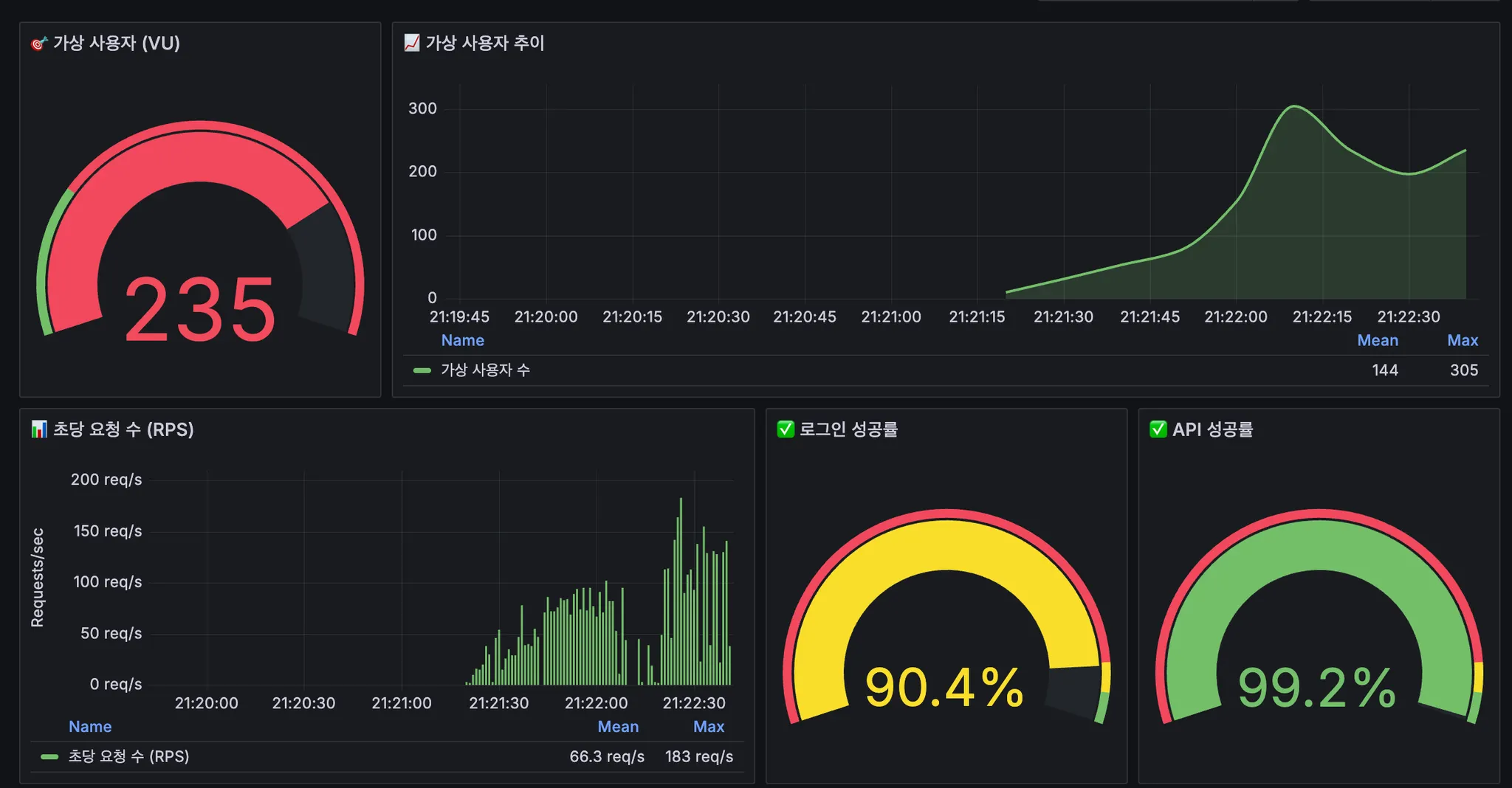
항목 | AS-IS | TO-BE | 개선율 |
로그인 성공률 | 83.48% | 89.16% | +6.8%p ↑ |
로그인 p(95) | 26.91초 | 17.45초 | 35% ↓ |
로그인 p(99) | 47.78초 | 51.75초 | 8% ↑ (악화) |
API p(95) | 3.11초 | 2.51초 | 19% ↓ |
전체 실패율 | 3.65% | 3.30% | 10% ↓ |
처리량 | 79.84 req/s | 89.23 req/s | 12% ↑ |
로그인 실패 | 462건 | 456건 | 1% ↓ |
분석 및 추가 개선 필요사항
여전히 남아 있는 문제 문제
•
로그인 p(99) 악화 이유:
◦
BruteForceManager delay는 비활성화 완료
◦
하지만 Redis의 동시성 경쟁 조건은 해결되지 않음
◦
3명 사용자에 대한 과도한 동시 요청 지속
•
근본적 해결 방안:
◦
테스트 사용자 증가 (가장 효과적)
▪
3명 → 100명
▪
사용자당 동시성: 50 VUs → 1.5 VUs
▪
예상 개선: 로그인 성공률 95%+, p(95) < 1초
◦
Redis 동시성 처리 개선
▪
낙관적 락 또는 분산 락 적용
▪
failCount 증가 시 race condition 방지
◦
테스트 시나리오 조정
▪
login_ramp: 150 VUs → 30-50 VUs
▪
점진적 증가로 현실적인 부하 시뮬레이션
요약
기술적 성과
•
문제 발견
◦
k6 + Grafana 부하 테스트로 BruteForceManager 병목 발견
◦
Thread.sleep()으로 28.8분 누적 지연 분석
•
환경별 설정 분리
◦
개발 환경: 성능 우선 (delay 비활성화)
◦
프로덕션: 보안 우선 (delay 유지)
◦
Spring @Value로 동적 설정 주입
•
개선
◦
로그인 p(95): 35% 개선 (26.91초 → 17.45초)
◦
API p(95): 19% 개선 (3.11초 → 2.51초)
◦
처리량: 12% 증가 (79.84 → 89.23 req/s)
•
추가 개선 방안 도출
◦
동시성 경쟁 조건 분석
◦
테스트 설계 개선 방향 제시
배운 점
이번 과정을 통해 보안과 성능은 상충 관계에 있으며, 상황에 따라 적절한 균형점을 찾아야 한다는 점을 배웠다.
또한 환경별 설정 분리의 중요성을 인식하며, 개발·테스트·운영 환경에서의 설정 관리가
시스템 안정성과 직결됨을 확인했다.
마지막으로, 부하 테스트와 동시성 문제는 단순한 설정 변경으로 해결되지 않으며,
구조적 설계와 적절한 전략과 시나리오 수립이 중요하다는 것을 알았다.