




프로그래밍 기초
•
소스(Source): 프로그래밍 언어로 작성한 파일
•
컴파일(Compile): 소스 파일을 기계어 파일로 번역
Java
•
자바에 대하여
◦
메모리 자동 정리 (Garbage Collection)
◦
풍부한 무료 라이브러리
◦
멀티 쓰레드
◦
객체 지향 프로그래밍 (OOP: Object-Oriented Programming)
◦
JVM (Java Virtual Machine)
▪
바이트 코드 파일을 운영체제를 위한 완전한 기계어로 번역하고 실행하는 역할
•
JDK와 JRE
◦
JDK: JRE + 개발/디버깅 도구
▪
open JDK ⇒ 개발, 학습용 및 상업용 모두 무료로 사용
▪
Oracle JDK ⇒ 개발, 학습용 무료로 사용, 상업용 목적은 연간 사용료 지불, 장기 기술지원 LTS
◦
JRE: Java Runtime Environment (자바 실행환경)
•

•
•
실습
•
PrintExample
package com.practice02;
public class PrintExample {
public static void main(String[] args) {
System.out.println("화면출력");
System.out.println("화면" + "출력"); // 문자열 연산
System.out.println(3.8);
System.out.println(3 + 5);
System.out.println("화면" + 3);
System.out.println("화면" + 3 + 4); // 화면34 => 문자열로 인식
System.out.println(3 + 5 + "화면"); // 숫자를 먼저 인식
}
}
Java
복사
•
x, y값 교환
package com.practice04;
public class VariableExchange {
public static void main(String[] args) {
int x = 3;
int y = 5;
System.out.println("x = " + x + ", y: " + y);
// x와 y값 교환하기
int temp = x;
x = y;
y = temp;
System.out.println("x = " + x + ", y: " + y);
}
}
Java
복사
•
문자열 예제
package com.practice05;
public class StringExample {
public static void main(String[] args) {
String name = "홍길동";
String job = "프로그래머";
System.out.println(name);
System.out.println(job);
String str = "나는 \"자바\"를 배웁니다.";
System.out.println(str);
str = "번호\t이름\t직업";
System.out.println(str);
System.out.print("나는\n");
System.out.print("자바를\n");
System.out.print("배웁니다.\n");
}
}
홍길동
프로그래머
나는 "자바"를 배웁니다.
번호 이름 직업
나는
자바를
배웁니다.
Java
복사
•
문자열 데이터 타입
// Java 13 부터는 텍스트 블록 문법을 제공
// 큰 따옴표 3개로 감싸면 작성된 그대로 문자열로 저장됨
// 줆바꿈을 하지 않고 이어서 작성하고 싶으면 맨 끝에 \를 붙여주면 됨
package com.practice05;
public class StringExample2 {
public static void main(String[] args) {
String str1 = "" +
"{\n" +
"\t\"id\":\"winter\",\n" +
"\t\"name\":\"눈송이\",\n" +
"}";
System.out.println(str1);
String str2 = """
{
"id":"winter",
"name":"눈송이"
}
""";
System.out.println(str2);
String str3 = """
나는 자바를 \
학습합니다,
나는 자바 고수가 될 겁니다.
""";
System.out.println(str3);
}
}
Java
복사
식별자
식별자: Java코드 내에서 사용되는 각각의단어
•
식별자 지정 규칙
◦
Java는 대소문자를 구분한다.
◦
첫문자는 반드시 영문자 또는_,$여야한다.
◦
그다음 문자부터는 숫자와 문자를 혼합하여 사용가능하다.
•
식별자의 종류
1.
시스템 정의 식별자 : Java 시스템이 필요에 의해 먼저 정의해 둔 식별자로 "예약어", "키워드"라고 부른다.
2.
사용자 정의 식별자 : 개발자가 필요에 의해 정의한 식별자로 "클래스명, 변수명, 메서드명"을 지정할 때
사용한다.
•
시스템 정의 식별자 종류
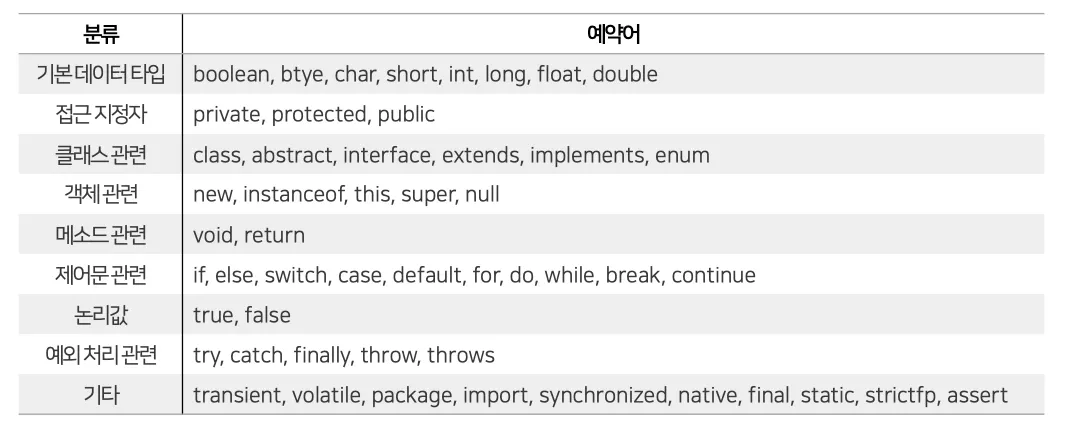
•
사용자 정의 식별자의 종류
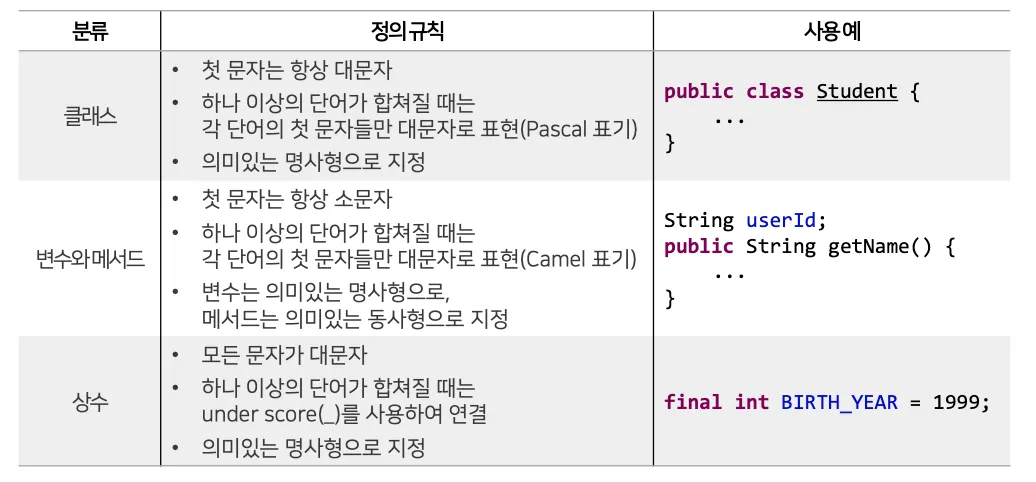
데이터 타입
•
기본 데이터 타입
◦
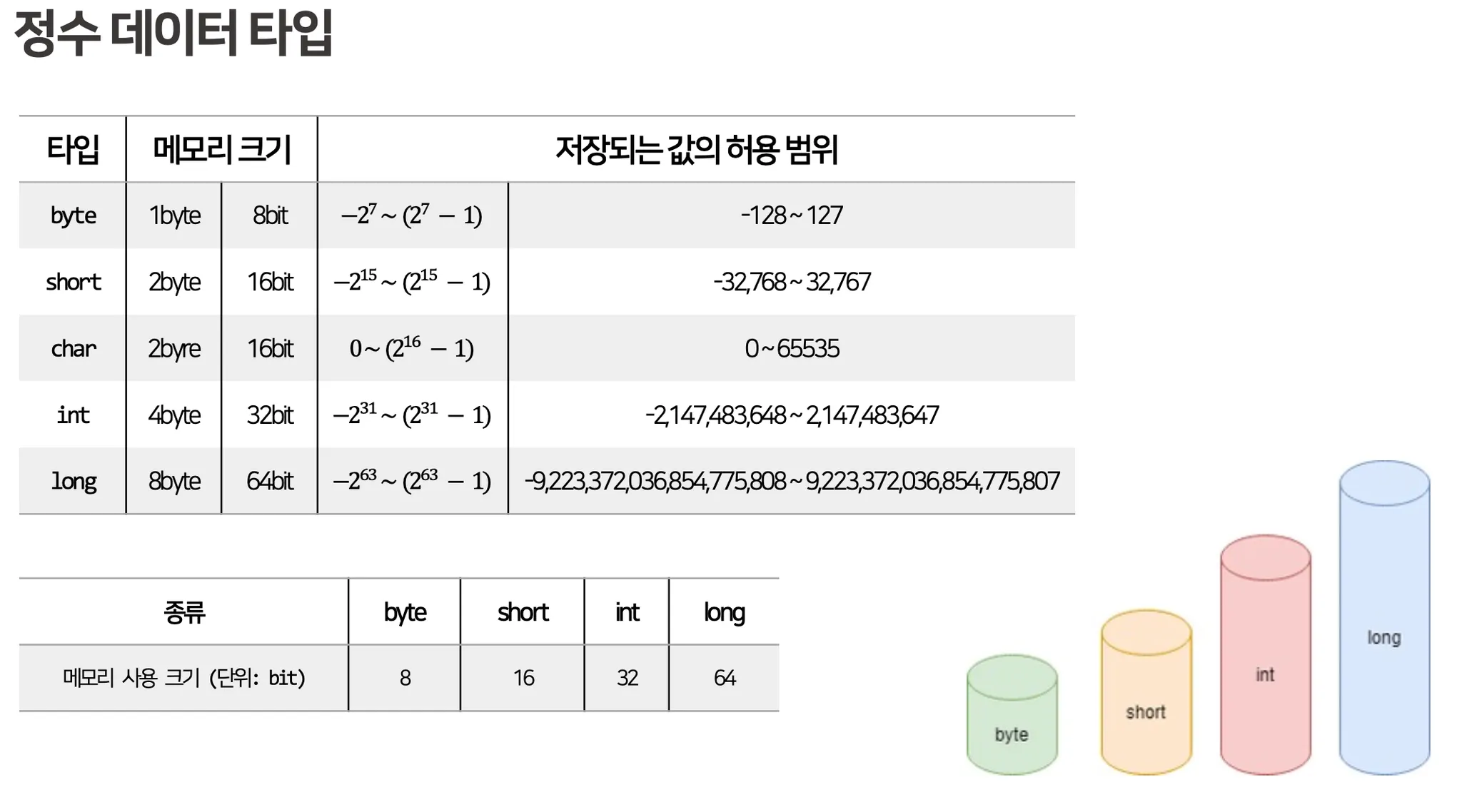
정수형: int, byte, char, long
◦
실수형: double, float
◦
논리형: true, false
◦
문자형: String
•
참조 데이터 타입
◦
기본 데이터 타입을 제외한 모든 데이터 타입
◦
배열, 클래스 / 인터페이스
•
문자 데이터 타입
◦
char 타입 제공
char var1 = 'A' // 'A' 문자 : 65
char var2 = '가'
Java
복사
리터럴
•
Java 언어가 처리하는 실제 값을 의미
◦
문자: 하나의 문자를 의미하며, 반드시 작은 따옴표로 표시
◦
문자열: 하나 이상의 문자 나열을 의미, 반드시 큰 따옴표로 표현
◦
정수
◦
실수
◦
논리
변수의 사용 범위
•
지역변수: 메소드 블록 내부에서 선언되어, 메소드 블록 내부에서 사용되는 변수
•
멤버변수: 클래스 블록 내부에서 사용 되는 변수(필드, 속성)
◦
인스턴스 변수:
static이 붙지 않은 변수로 외부에서 사용할 때에는 반드시 new 연산자로 객체를 생성해서 사용
◦
클래스 변수:
객체를 생성하지 않고도 접근 가능한 변수
상수
•
값이 변경될 수 없는 것을 상수라고 한다. final 키워드 사용하면 변수를 상수로 만들 수 있다.
•
일반적으로 변수명과 구분하기 위해 상수명은 대문자로 설정한다.
실수
•
컴파일러는 실수 리터럴을 double 타입 값으로 간주한다.
•
float 타입의 허용 범위를 초과하는 리터럴은 뒤에[f 또는 F]을 붙여 float 타입의 값임을 표시해야 한다.
자동 타입 변환 (Promotion)
•
자동으로 데이터 타입 변환 일어나는 것
◦
값의 허용 범위가 작은 타입이 허용 범위가 큰 타입으로 대입될 때 발생
•
캐스팅은 강제로 타입 변환 일어나는 것
•
기본 타입을 허용 범위 순으로 나열하면 아래와 같음
◦
byte < short, char < int < long < float < double
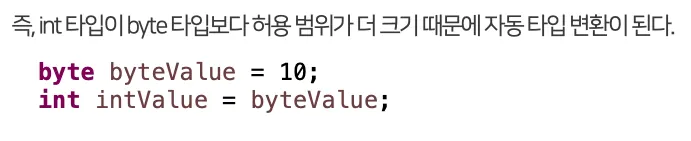
•
예외

강제 타입 변환 (Casting)
•
괄호를 사용하여 괄호 안에 작은 허용 범위 타입을 기재한다.
•
원래 값은 유지하면서 타입을 바꿔주기 위해 활용
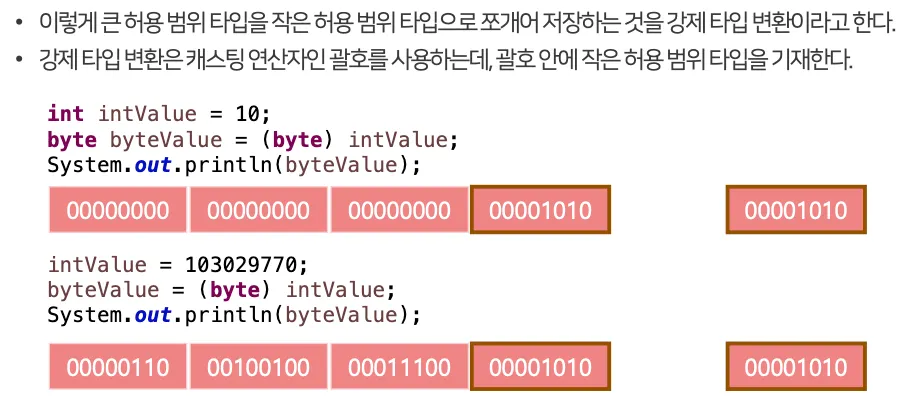
범위
연산식에서 자동 타입 변환
•
자바는 실행 성능 향상을 위해 컴파일 단계에서 연산을 수행
•
피연산자 중 하나라도 double 타입이면 다른 피연산자도 double 타입으로 변환되어 연산되고, 연산 결과 또한 double 타입이 된다.
double dResult = 1.2f + 3.4;
Java
복사
•
int 끼리 계산할 경우 캐스팅 해줘야 함
package com.practice06;
public class PromotionExample2 {
public static void main(String[] args) {
int x = 1;
int y = 2;
double result = x / (double) y;
System.out.println(result);
}
}
Java
복사
•
예제 코드
package com.practice06;
public class PromotionExample2 {
public static void main(String[] args) {
int x = 1;
int y = 2;
double result = x / (double) y;
System.out.println(result);
// -----------------------------------
System.out.println("----------------------------");
byte result1 = 10 + 20;
System.out.println("result1: " + result1);
byte v1 = 10;
byte v2 = 20;
int result2 = v1 + v2;
System.out.println("result2: " + result2);
byte v3 = 10;
int v4 = 100;
long v5 = 1000L;
long result3 = v3 + v4 + v5;
System.out.println("result3: " + result3);
char v6 = 'A';
char v7 = 1;
int result4 = v6 + v7;
System.out.println("result4: " + result4); // 65 + 1
System.out.println("result4: " + (char)result4); // B
int v8 = 10;
int result5 = v8 / 4;
System.out.println("result5: " + result5); // 2
int v9 = 10;
double result6 = v9 / 4.0;
System.out.println("result6: " + result6); // 2.5
int v10 = 1;
int v11 = 2;
double result7 = (double) v10 / v11;
System.out.println("result7: " + result7); // 0.5
}
}
Java
복사
변수사용범위
•
예졔 코드
package com.practice06;
public class ScopeExample {
public static void main(String[] args) {
int v1 = 15;
if (v1 > 10) {
int v2 = v1 - 10;
}
int v3 = v1 + v2 + 5; // 에러 발생
System.out.println(v3);
}
}
Java
복사
package com.practice06;
public class ScopeExample {
public static void main(String[] args) {
int v1 = 15;
int v2 = 0; // 블록 바깥에서 선언 및 초기화하여 사용해야 한다.
if (v1 > 10) {
v2 = v1 - 10;
}
int v3 = v1 + v2 + 5; // 에러 발생
System.out.println(v3);
}
}
Java
복사
콘솔 입력과 출력
•
출력: System.out.println()
•
입력: Scanner 타입 변수 선언
import java.util.Scanner;
Scanner sc = new Scanner(System.in);
// Enter를 입력하기 전까지 읽은 문자열을 변수에 저장
String inputData = sc.nextLine();
Java
복사
•
예제
package com.practice07;
import java.util.Scanner;
public class AverageExample {
public static void main(String[] args) {
int sum = 0;
double average = 0;
// 3명의 수학점수를 입력받을 것이다.
Scanner sc = new Scanner(System.in);
System.out.print("1번 수학점수: ");
String math1 = sc.nextLine();
System.out.print("2번 수학점수: ");
String math2 = sc.nextLine();
System.out.print("3번 수학점수: ");
String math3 = sc.nextLine();
sum = Integer.parseInt(math1) + Integer.parseInt(math2) + Integer.parseInt(math3);
average = (double)sum / 3;
System.out.println("총 합계 : " + sum);
System.out.println("평균 : " + average);
}
}
Java
복사
package com.practice07;
import java.util.Scanner;
public class AverageExample {
public static void main(String[] args) {
int sum = 0;
double average = 0;
// 3명의 수학점수를 입력받을 것이다.
Scanner sc = new Scanner(System.in);
System.out.print("1번 수학점수: ");
int math1 = sc.nextInt();
System.out.print("2번 수학점수: ");
int math2 = sc.nextInt();
System.out.print("3번 수학점수: ");
int math3 = sc.nextInt();
sum = math1 + math2 + math3;
average = (double)sum / 3;
System.out.println("총 합계 : " + sum);
System.out.println("평균 : " + average);
}
}
Java
복사
연산자
•
기본 예제 실습
package com.practice08;
public class OperatorExample1 {
public static void main(String[] args) {
int x = 1;
int y = 1;
int result1 = ++x + 10; // 2 + 10 (선증가)
int result2 = y++ + 10; // 1 + 10 (후증가)
System.out.println(result1); // 12
System.out.println(result2); // 11
System.out.println(x); // 2
System.out.println(y); // 2
}
}
Java
복사
•
증감 연산자 실습
package com.practice08;
public class OperatorExample2 {
public static void main(String[] args) {
int x = 10, y = 10, z;
x++; // 10
++x; // 11 => 12
System.out.println("x : " + x); // 12
System.out.println("-----------");
y--; // 10
--y; // 9 -> 8
System.out.println("y = " + y); // 8
System.out.println("-----------");
z = x++; // 12
System.out.println("x = " + x); // 13
System.out.println("z = " + z); // 12
System.out.println("-----------");
z = ++x; // z = 14, x = 14
System.out.println("x = " + x); // 14
System.out.println("z = " + z); // 14
System.out.println("-----------");
z = ++x + y++; // z = 15 + 8 = 23
System.out.println("x = " + x); // x = 15
System.out.println("y = " + y); // y = 9
System.out.println("z = " + z); // z = 23
}
}
Java
복사
•
자료형 연산 실습
package com.practice08;
public class OperatorExample3 {
public static void main(String[] args) {
byte v1 = 10;
byte v2 = 4;
long v3 = 10L;
int result1 = v1 + v2;
System.out.println("result1 = " + result1);
System.out.println("=====================");
long result2 = v1 + v2 - v3;
System.out.println("result2 = " + result2);
System.out.println("=====================");
double result3 = (double) v1 / v2;
System.out.println("result3 = " + result3);
System.out.println("=====================");
int result4 = v1 % v2;
System.out.println("result4 = " + result4);
System.out.println("=====================");
}
}
Java
복사
•
오버플로우 예제 실습
◦
범위 안에서 출력이 됨
package com.practice08;
public class OverflowExample {
public static void main(String[] args) {
byte byteValue = 127;
System.out.println(++byteValue); // -128
System.out.println(--byteValue); // 127
short shortValue = 32767;
System.out.println(++shortValue); // -32768
System.out.println(--shortValue); // 32767
int intValue = 2_147_483_647;
System.out.println(++intValue); // -2147483648
System.out.println(--intValue); // 2147483647
long longValue = 9_223_372_036_854_775_807L;
System.out.println(++longValue); // -9_223_372_036_854_775_808
System.out.println(--longValue); // 9_223_372_036_854_775_807
byte var1 = 125;
for (int i = 0; i < 5; i++) {
if (Byte.MAX_VALUE == var1) {
break;
}
var1++;
System.out.println("var1: = " + var1);
}
}
}
Java
복사
•
주의사항
package com.practice08;
import java.util.Scanner;
public class MistakeExample {
public static void main(String[] args) {
// 정확한 계산을 위해서는 실수 타입 연산을 최대한 피해야 한다.
Scanner sc = new Scanner(System.in);
int apple = 1;
double pieceUnit = 0.1;
System.out.print("몇 조각을 드셨나요?: ");
int number = sc.nextInt();
double result = apple - number * pieceUnit;
System.out.println("사과 1개에서 남은 양: " + result);
}
}
Java
복사
package com.practice08;
import java.util.Scanner;
public class MistakeExample2 {
public static void main(String[] args) {
// 정확한 계산을 위해서는 실수 타입 연산을 최대한 피해야 한다.
Scanner sc = new Scanner(System.in);
int apple = 1;
int totalPiece = 10;
System.out.print("몇 조각을 드셨나요?: ");
int number = sc.nextInt();
double result = (totalPiece - number) / 10.0;
System.out.println("사과 1개에서 남은 양: " + result);
}
}
Java
복사
나누기 연산 후 NaN과 Infinity 처리
•
실습
package com.practice08;
public class ExceptionExample {
public static void main(String[] args) {
double infinity = 5 / 0.0;
System.out.println(infinity);
double notANumber = 5 % 0.0f;
System.out.println(notANumber);
// 조건문 실행되지 않음
if (!Double.isInfinite(infinity)) {
double result1 = infinity + 1;
System.out.println(result1);
}
// 조건문 실행되지 않음
if (!Double.isNaN(notANumber)) {
double result2 = notANumber + 1;
System.out.println(result2);
}
}
}
Java
복사
비교 연산자
package com.practice08;
import java.util.Scanner;
public class OperatorExample4 {
public static void main(String[] args) {
System.out.println('A' == 65);
System.out.println('A' < 66);
System.out.println(3.0 == 3);
// 실수 타입은 정밀도 차이로 인해 정확한 비교가 안된다.
// 0.00010010101010101010100000 double
// 0.001100101010101 float
// System.out.println(0.1 == 0.1f);
// System.out.println(0.1 < 0.1f);
System.out.println((float)0.1 == 0.1f);
// 문자열 비교는 비교연산자 사용이 불가능하다.
// 참조데이터 타입은 값이 아닌 메모리 주소를 비교하기 때문에!!!
String name1 = "하민성";
String name2 = "하민";
name2 = name2 + "성"; // 새로운 객체로 반환하기 때문에 메모리 주소가 달라짐
System.out.println(name1 == name2); // false로 반환됨
// 따라서 문자열 비교는 비교연산자 대신 equals(), !equals()를 사용한다.
System.out.println(name1.equals(name2));
Scanner sc = new Scanner(System.in);
String target = "Hello";
System.out.print("비교 대상 문자열 입력: ");
String input = sc.nextLine();
System.out.println("target과 input의 연산자 비교 : " + (target == input)); // false
System.out.println("target과 input의 메소드 비교 : " + (target.equals(input))); // true
}
}
Java
복사
연산자 - 실습
•
example1
package com.practice;
public class Example1 {
// 'A' => 65, 'B' => 66, '1' => 49, '2' => 50
public static void main(String[] args) {
String s1 = "1";
String s2 = "2";
boolean bnx = false;
char c1 = 'A';
char c2 = 'B';
char c3 = '1';
char c4 = '2';
int inx = 2;
System.out.println(Integer.parseInt(s1 + s2)); // 12
System.out.println(Integer.parseInt(s2) == inx); // true
System.out.println(c1 + c1 + 1); // 131
System.out.println(c4 + 1); // 51
System.out.println((c4 * 2) - 1); // 99
}
}
// ===========================================================
package com.practice;
public class Example1 {
public static void main(String[] args) {
String s1 = "1";
String s2 = "2";
boolean bnx = false;
char c1 = 'A';
char c2 = 'B';
char c3 = '1';
char c4 = '2';
int inx = 2;
System.out.println(Integer.parseInt(s1 + s2)); // 12
// System.out.println(Integer.parseInt(s2) == inx); // true
System.out.println(!bnx); // true
System.out.println(c1 + c1 + 1); // 131
System.out.println(c4 + Integer.parseInt(s1)); // 51
System.out.println(c3 + c4); // 99
}
}
Java
복사
•
example2
package com.practice;
public class Example2 {
public static void main(String[] args) {
int num = 456;
// int result = (num / 100) * 100;
int result = num - (num % 100);
System.out.println(result); // 400
}
}
Java
복사
•
example3
package com.practice;
public class Example3 {
public static void main(String[] args) {
char ch = 'z';
boolean b = (ch >= 'A' && ch <= 'z') || (ch >= 'a' && ch <= 'z');
System.out.println(b); // true
}
}
Java
복사
•
example4
package com.practice;
public class Example4 {
public static void main(String[] args) {
int fahrenheit = 100;
float celcius = (float) 5 / 9 * (fahrenheit - 32);
System.out.println("Fahrenheit: " + fahrenheit);
System.out.println("Celcius: " + celcius);
}
}
Java
복사
•
example5
package com.practice;
public class Example5 {
public static void main(String[] args) {
byte a = 10;
byte b = 20;
byte c = (byte)(a + b);
char ch = 'A';
ch = (char)(ch + 2);
float f = (float) c / b;
float f2 = 0.1f;
double d = 0.1;
boolean result = (float)d == f2;
System.out.println("c = " + c); // 30
System.out.println("ch = " + ch); // C
System.out.println("f = " + f); // 1.5
System.out.println("result = " + result); // true
}
}
Java
복사